If you are sourcing pre-owned luxury inventory to scale your business, you already know that Japanese auction houses offer a wide selection of authentic, high-margin designer fashion. But when you’re running a busy reselling business, scrolling through thousands of listings can feel like a full-time job.
To help you source inventory more efficiently, Buyee’s LuxeWholesale platform has these three powerful feature updates that will help you save time efficiently!
Here is how to leverage Search Filters, Save This Search, and Watchlist Bulk Bidding to cut your sourcing time in half.
Table of Contents
Find Exact Luxury Items with Search Filters
Finding a specific vintage Chanel double flap bag or a mint condition Louis Vuitton Speedy 30 shouldn’t feel like searching for a needle in a haystack.
Our Search Filters tool allows you to hyper-focus your hunt. You can instantly sort through thousands of luxury auction listings by:
Search by Brand
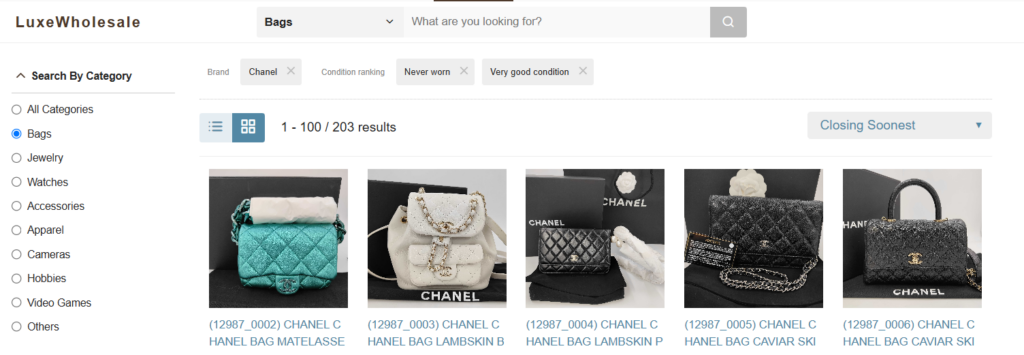
From premium brands like Hermes and Chanel to contemporary favorites like Coach, you can instantly filter the database to display only the specific, in-demand brands you want to source.
Filter by Category
This filter lets you select exact item categories including Bags, Watches, Jewelry, Accessories, and Apparel—so you only see the items that fit your store.
Narrow down with Condition Rank
Target Never worn or Very good condition, “like-new” items for premium buyers, or search for Good to Fair condition pieces that yield massive margins after a light restoration or cleaning.
Example: Search for Chanel Bag in Never Worn or Very Good Condition
*Free Buyee Account is Required
Lock In Your Criteria with “Save This Search” Feature
Stop typing the exact same brand names condition metrics every single search. Let LuxeWholesale do the heavy lifting for you.
With the Save This Search feature, you can lock in your exact search criteria and ideal filter settings with a single click.
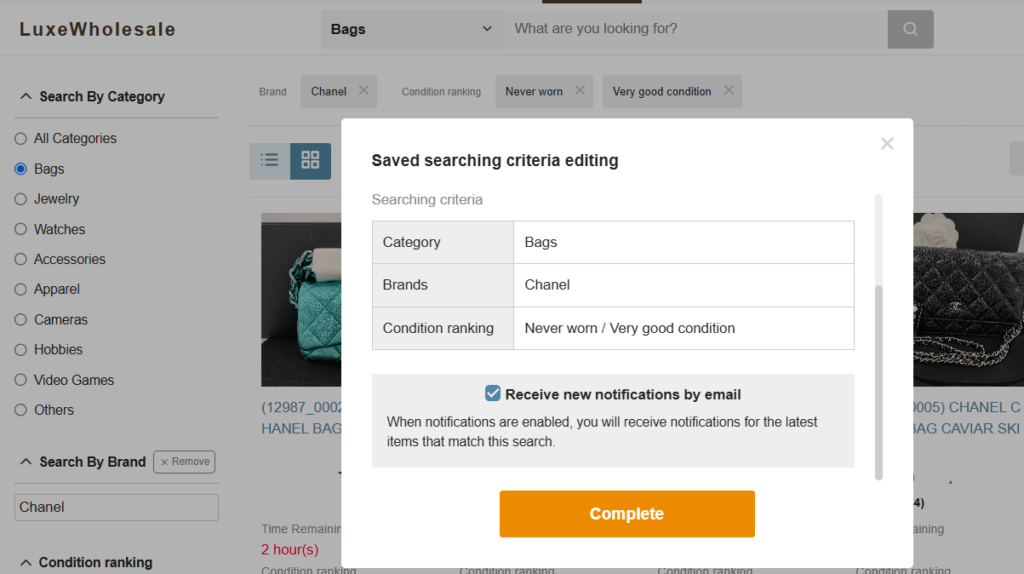
One-Click Search Shortcuts
Once saved, your favorite search criteria appear as quick-access buttons right below the main search bar. The next time you log in, you don’t have to manually rebuild your filters—just click your custom button to instantly load your tailored inventory feed.
New Items Notifications
Don’t worry about missing out while you’re away from your desk. By enabling notifications for your saved searches, you will receive e-mail notifications when new items matching your criteria hit the market.
Submit Multiple Bids with Bulk Bidding
If you are still opening dozens of browser tabs just to input individual maximum bids on your favorite items, your sourcing workflow is costing you time.
With Watchlist Bulk Bidding, you can view your entire curated watchlist in a single dashboard and input bids across multiple items simultaneously.
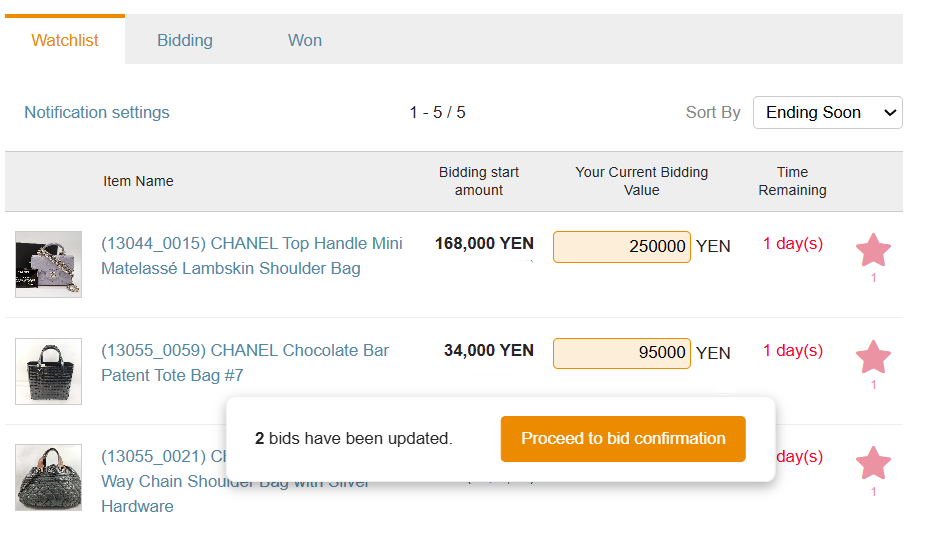
Here is how to streamline your bidding workflow in three quick steps:
Step 1. Build Your Watchlist:
Browse LuxeWholesale and click the star icon to save items directly to your personal Watchlist.
Step 2. Enter Your Maximum Bids
Go to “My Page” and open your Watchlist. Enter your maximum bid amount for each item directly into the corresponding text field. No page reloading or tab-switching required.
Step 3. Review and Bulk Confirm:
Double-check your numbers, hit the Proceed to Bid button, and let LuxeWholesale’s proxy bidding system do the work.
It’s really that simple! Sourcing from Japanese luxury auctions no longer requires hours of manual data entry. With these tools in your arsenal, you can manage your bidding workflow in a fraction of the time, leaving you free to focus on what matters most!
Join Japan’s Exclusive Luxury Auctions through Buyee’s LuxeWholesale
Start bidding on Pre-Owned Luxury Items!
Not a Buyee Member yet? Register for FREE!
New to LuxeWholesale? Take a minute to read our past blogs!
Read:👉Unlock Exclusive Access to Japan’s Secret Pre-Owned Luxury Auctions through Buyee’s LuxeWholesale